Choosing the Best Wifi Portable Projector is not only about brightness or a sleek shell. It is about how easily the device fits into real life. A compact projector may sit beside a bed, face a blank apartment wall, or travel inside a padded backpack. On movie night, weak WiFi can matter more than a few extra lumens. That is the uncomfortable part.
CNET projector reviewer David Carnoy has described the category plainly: “Portable projectors have come a long way.” His observation reflects what buyers now expect from small devices. Modern models can offer automatic focus, built-in streaming systems, Bluetooth speakers, and batteries lasting through a short film. Still, specifications can mislead. Brightness ratings may use different standards, while built-in apps can vary by region or lose support over time. A careful comparison needs more than a colorful product page.
This guide examines ten WiFi portable projectors for home and travel. We consider measured brightness, image sharpness, wireless stability, fan noise, battery behavior, setup speed, and software reliability. We also look at practical details, such as whether the projector stays steady on a hotel desk or corrects a tilted image without excessive cropping. Some compromises are unavoidable. A brighter model may be heavier. A pocket-sized unit may struggle in daylight. No projector wins every room.
The strongest choice depends on your habits. Use these findings as a realistic starting point, not a promise of perfection.
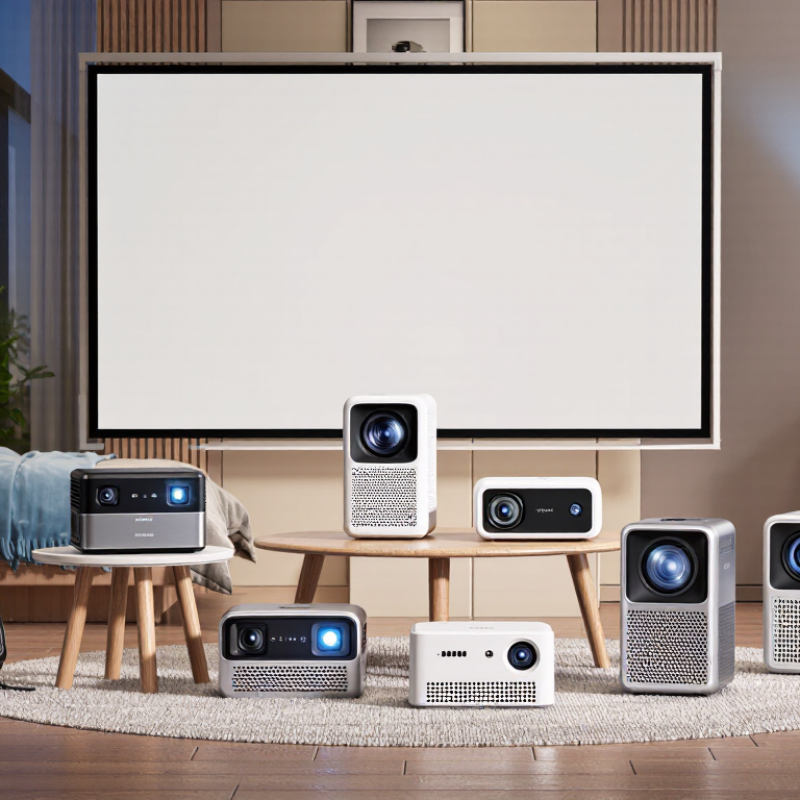
What Makes a WiFi Portable Projector Suitable for Home and Travel
A WiFi portable projector should work comfortably in both a living room and a travel bag. For home use, look for clear 1080p images, reliable wireless casting, and enough brightness for curtains that do not close completely. A dark room still produces better contrast. Brightness claims can vary, so practical testing matters more than impressive packaging numbers.
Travel changes the priorities. Weight matters. A useful model should have a built-in battery, simple controls, and automatic focus or keystone correction. These features help when projecting onto an uneven hotel wall or a temporary outdoor screen. Dual-band WiFi can reduce connection problems, while Bluetooth support may connect to headphones or a compact speaker. Physical HDMI and USB ports are valuable when wireless streaming becomes unreliable.
I once tested a small projector in a bright room and expected too much from it. The image looked acceptable at night but washed out during the afternoon. That experience was a useful reminder: portability cannot replace optical performance. Check fan noise, battery runtime, heat control, and software update support before buying. A projector that starts quickly and remembers network settings may feel more convenient than one with higher specifications. Still, every setup has compromises. A lightweight unit may have weaker speakers, shorter battery life, or limited brightness, so buyers should match the device to their actual rooms and travel habits.
Key Features to Compare Before Choosing a Portable WiFi Projector
Choosing among the 10 best WiFi portable projectors requires more than checking their advertised picture size. Start with brightness, measured in ANSI lumens, because a dim bedroom and a sunny hotel room demand different performance. Resolution also matters. Full HD produces sharper subtitles and presentation charts than basic HD. I compare images at three meters, not only in a showroom.
WiFi performance can make or break the experience. Check whether the projector supports current wireless standards and reliable screen mirroring. Some models connect quickly, while others need repeated setup. Annoying, but real. Built-in streaming access may be convenient, yet app support can change over time. HDMI and USB ports provide useful backup options. A short-throw design saves space, but it may increase image distortion if placement is careless.
Battery capacity deserves practical testing. A projector promising several hours may last less with high brightness and strong speakers enabled. Weight, fan noise, autofocus, and automatic keystone correction affect travel comfort. I also inspect the lens cover, carrying case, and ventilation openings before buying. Heat needs an escape route. Sound quality is usually acceptable for casual viewing, but outdoor movie nights may require a separate speaker. No option is perfect. Choose the weaknesses you can tolerate.
10 Best WiFi Portable Projectors for Home and Travel
Key specification benchmarks to compare before choosing a portable WiFi projector.
The chart summarizes commonly published specification ranges for compact WiFi projectors. Values are rounded practical benchmarks rather than brand-specific ratings: brightness is measured in ANSI lumens, battery life in hours, weight in kilograms, screen size in inches, throw ratio as a ratio, keystone correction in degrees, and connectivity counts indicate commonly available ports or wireless standards.
The 10 Best WiFi Portable Projectors for Different Viewing Needs
The 10 Best WiFi Portable Projectors for Different Viewing Needs
The best WiFi portable projector depends on where and why you watch. For movie nights, choose a model with strong contrast, 1080p resolution, and automatic focus. A compact unit with a built-in battery suits hotel rooms and camping trips. For gaming, low input lag matters more than extreme brightness. Presenters need clear text, quick wireless casting, and dependable battery performance.
The market is expanding. Grand View Research’s 2024 analysis forecasts steady growth in portable projectors through 2030, driven by flexible home entertainment and mobile use. Deloitte’s 2024 Digital Media Trends report found that U.S. households subscribe to about four paid streaming services and spend roughly 61 dollars monthly. A WiFi projector can make that content feel larger, but wireless performance depends on room distance, network congestion, and app compatibility. Marketing claims can look impressive. Real rooms are less forgiving.
Tips:
Measure your viewing distance before buying. A 100-inch image needs more space than expected. Check ANSI lumens, not vague brightness claims. For travel, keep the weight below two kilograms and confirm offline playback options. Outdoor viewing also needs dusk or darkness. I once underestimated fan noise in a quiet bedroom. That small detail changed the experience. Keystone correction helps, but it can soften fine text. Evaluate the compromises honestly.
How to Set Up and Use a Portable Projector with WiFi
A portable projector works best when its WiFi setup is planned before movie night. Place it on a stable table, about two to three meters from a blank wall. Keep the lens level with the screen to reduce awkward keystone correction. Connect the projector to power, turn it on, and open its network settings. Choose your home network, enter the password carefully, and wait for confirmation. Do not rush.
If streaming from a phone, connect both devices to the same WiFi network. Then select screen mirroring or wireless display in the phone’s quick settings. Some phones block protected video, so a wired connection may work better. This limitation is easy to miss. For travel, a personal hotspot can help, but it may consume mobile data quickly. Check your data plan before streaming.
Before playing, lower room lighting and test the sound at a comfortable volume. A small speaker can help, but place it beside the image, not behind it. Update the projector only through its official settings menu. Avoid unknown files and open networks. I have sometimes blamed weak WiFi when the real problem was a crowded room or a loose power cable. That mistake is useful: check distance, network strength, focus, and input mode in that order. For travel, save legally obtained media offline and test it before leaving home. A five-minute rehearsal prevents frustrating surprises.
10 Best WiFi Portable Projectors for Home and Travel? - How to Set Up and Use a Portable Projector with WiFi
| Rank |
Portable Projector Type |
Native Resolution |
Brightness |
WiFi Capability |
Battery Runtime |
Weight |
Recommended Image Size |
Best For |
| 1 |
Compact Full HD Travel Unit |
1920 × 1080 |
400–600 ANSI lumens |
Dual-band 2.4/5 GHz |
2–3 hours |
1.0–1.5 kg |
40–100 inches |
Hotel rooms, bedrooms, and outdoor use after sunset |
| 2 |
Smart Streaming Mini Projector |
1920 × 1080 |
300–500 ANSI lumens |
Dual-band 2.4/5 GHz |
1.5–2.5 hours |
0.7–1.2 kg |
30–80 inches |
Streaming films and casual entertainment |
| 3 |
High-Brightness Portable Projector |
1920 × 1080 |
800–1,200 ANSI lumens |
Dual-band 2.4/5 GHz |
No internal battery |
1.8–2.8 kg |
50–120 inches |
Living rooms, presentations, and brighter environments |
| 4 |
Pocket LED Projector |
1280 × 720 |
100–250 ANSI lumens |
2.4 GHz WiFi |
1.5–2.5 hours |
0.4–0.8 kg |
20–60 inches |
Backpacking, short trips, and personal viewing |
| 5 |
Family Movie Night Projector |
1920 × 1080 |
500–800 ANSI lumens |
Dual-band 2.4/5 GHz |
No internal battery |
1.5–2.5 kg |
60–120 inches |
Home cinema, cartoons, sports, and gaming |
| 6 |
Business Presentation Projector |
1280 × 800 |
2,000–3,000 ANSI lumens |
Dual-band 2.4/5 GHz |
No internal battery |
2.0–3.5 kg |
50–150 inches |
Classrooms, offices, and conference rooms |
| 7 |
Outdoor Evening Projector |
1920 × 1080 |
600–1,000 ANSI lumens |
Dual-band 2.4/5 GHz |
2–3 hours |
1.2–2.2 kg |
50–120 inches |
Backyards, camping areas, and evening events |
| 8 |
Short-Throw Portable Projector |
1920 × 1080 |
700–1,200 ANSI lumens |
Dual-band 2.4/5 GHz |
No internal battery |
2.0–3.2 kg |
40–100 inches |
Small apartments and rooms with limited throw distance |
| 9 |
USB-C Travel Projector |
1920 × 1080 |
300–600 ANSI lumens |
Dual-band 2.4/5 GHz |
1.5–2.5 hours |
0.8–1.4 kg |
30–90 inches |
Laptop, tablet, and phone presentations while traveling |
| 10 |
Budget WiFi Home Projector |
1280 × 720 |
150–300 ANSI lumens |
2.4 GHz WiFi |
No internal battery |
1.0–1.8 kg |
40–100 inches |
Occasional indoor viewing in dark rooms |
How to Set Up and Use a Portable Projector with WiFi
| Step |
Action |
Recommended Practice |
Common Issue to Check |
| 1 |
Position the projector |
Place it on a stable, level surface with unobstructed ventilation. |
Avoid soft bedding, enclosed shelves, and direct heat. |
| 2 |
Connect power |
Fully charge battery models or use the supplied power adapter. |
A low battery can reduce brightness or interrupt streaming. |
| 3 |
Open network settings |
Select the projector’s WiFi menu and choose the correct home network. |
Use the 2.4 GHz band if the projector is far from the router. |
| 4 |
Enter the WiFi password |
Type the password carefully, including capitalization and symbols. |
Public networks with browser sign-in pages may not connect. |
| 5 |
Adjust the image |
Focus the lens and use automatic keystone correction only when necessary. |
Digital keystone correction can slightly reduce image detail. |
| 6 |
Connect a source device |
Use screen mirroring, a compatible streaming app, USB, or HDMI. |
Some protected streaming content may block wireless mirroring. |
| 7 |
Optimize viewing conditions |
Dim the room and use a matte white screen or light-colored wall. |
Ambient light reduces contrast and makes dark scenes look gray. |
| 8 |
Manage audio |
Use the built-in speaker for casual viewing or connect Bluetooth/ wired audio. |
Bluetooth audio may have a small delay during video playback. |
Maintenance, Safety, and Travel Tips for Portable Projectors
A portable projector needs gentler care than a television. I wipe the lens with a clean microfiber cloth before every trip. Dust can soften details and create bright spots. Never spray cleaner directly onto the lens. Use a small hand blower first. Compressed air may push particles deeper inside.
Heat is a quiet enemy. Keep ventilation openings clear, especially during long movie sessions. Place the projector on a hard, stable surface, not a bed or suitcase. After shutdown, I wait until the fan stops before packing it. That habit is easy to ignore. It probably protects internal parts over time. The Global E-waste Monitor 2024 reports 62 million tonnes of electronic waste generated in 2022. Careful maintenance can delay replacement and reduce waste. Keep it cool.
Travel requires more than a padded case. The International Air Transport Association’s 2025 passenger guidance advises protecting spare lithium batteries against short circuits and carrying them in cabin baggage. Check current airline rules before departure. Store cables separately, and let a cold projector reach room temperature before switching it on. Condensation can form inside the housing. At home, keep brightness moderate when possible, and avoid blocking the exhaust during use. IEC 62471 provides a framework for evaluating lamp and LED photobiological safety, so users should avoid staring into the beam and keep children away from direct light. I still sometimes pack too quickly. That mistake deserves more attention.
Conclusion
Choosing the Best Wifi Portable Projector for home and travel means balancing image quality, portability, battery life, connectivity, and ease of use. This guide explains what makes a projector practical in different environments, from family movie nights and presentations to outdoor viewing and hotel-room entertainment. It also highlights key features to compare, including brightness, resolution, wireless compatibility, built-in speakers, storage options, operating system support, and setup flexibility. The featured selection covers ten projectors suited to different viewing needs and budgets, without focusing on any specific brand.
You will also learn how to connect a portable projector to WiFi, mirror compatible devices, adjust the image, and improve sound for a smoother viewing experience. Practical advice on cleaning the lens, protecting the device from heat and moisture, charging safely, packing it securely, and following travel requirements helps extend its lifespan. With the right combination of features and careful handling, a WiFi portable projector can provide convenient entertainment and useful presentation support wherever you go.

 Youxi projection